

You open ChatGPT, click the model selector, and you expect to see GPT-5. But it’s not there. You only see GPT-4o or another older model. That feels confusing, especially if you pay for ChatGPT Plus or use an Enterprise account. This guide explains what this issue means, why it happens, how to fix it, and how to prevent it next time.
What Is the “ChatGPT 5 Not Showing Up” Issue?
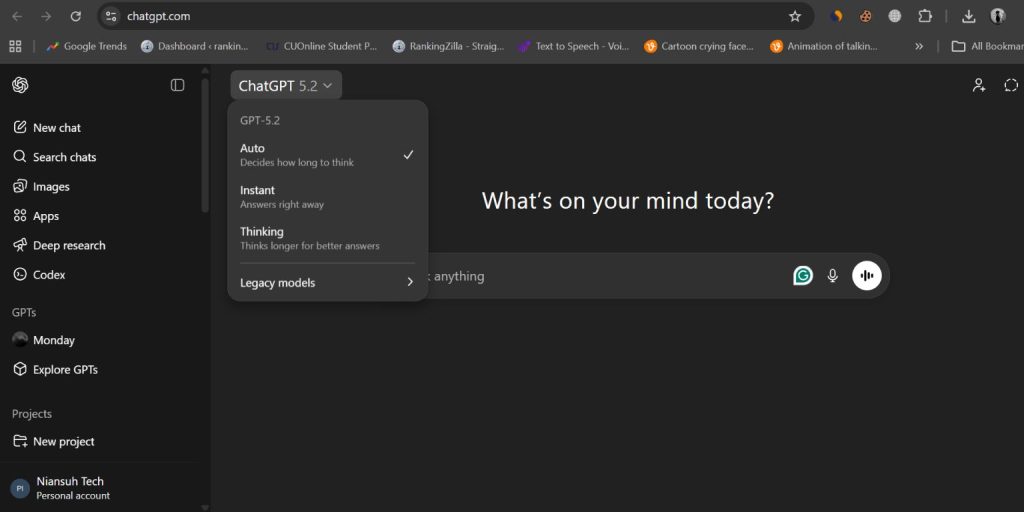 When people say ChatGPT 5 is not showing up, they mean the GPT-5 model does not appear inside the ChatGPT interface. This can happen in the ChatGPT web app, the mobile app on Android or iOS, or inside a workspace linked to ChatGPT Team or ChatGPT Enterprise. The model selector may only list GPT-4o, GPT-4.1, or other available language models.
In many cases, this is not a system crash. Instead, it relates to OpenAI model rollout, account permissions, subscription tier limits, or feature flags managed on OpenAI servers.
Users usually notice this problem in specific places. It often appears in the web version at chat.openai.com, inside the ChatGPT mobile app, or in a company workspace dashboard. Some developers also check the OpenAI API dashboard and compare model access there.
Common Causes of ChatGPT 5 Not Showing Up
This issue can happen for several reasons depending on your subscription plan, region, or app version. Below are the most common causes linked to OpenAI deployment and account settings.
- GPT-5 has not been officially released by OpenAI to the public
- Gradual feature rollout where only selected accounts receive early access
- ChatGPT Free plan restrictions that limit advanced model access
- Subscription not upgraded to ChatGPT Plus, Team, or Enterprise
- Outdated ChatGPT mobile app on iOS or Android
- Corrupted browser cache or cookies blocking model updates
- Region-based availability limits due to compliance or infrastructure rollout
How to Fix ChatGPT 5 Not Showing Up?
To resolve this issue efficiently, check both your account settings and system environment. In most cases, GPT-5 visibility depends on subscription access, app updates, region availability, or official release timing.Fix #1: Confirm GPT-5 Release Status
Sometimes GPT-5 is not visible because OpenAI has not publicly released it. Checking official announcements helps you avoid guessing.
Follow the steps below to easily confirm release status.
- Visit the official OpenAI website.
- Go to the News or Updates section.
- Review recent model announcements.
- Check for GPT-5 release notes.
- Confirm whether it is public or limited access.
If GPT-5 is not listed in official updates, it may not be available yet.
Fix #2: Check Your ChatGPT Subscription Plan
GPT-5 may require ChatGPT Plus, Team, or Enterprise access. Free accounts often have limited model options.
You can perform the following steps to check your plan.
- Log into your ChatGPT account.
- Click your profile icon.
- Select My Plan or Settings.
- Review your subscription tier.
- Upgrade if needed.
- Refresh the dashboard.
After upgrading, the model selector may update automatically.
Fix #3: Update the ChatGPT App
An outdated app version may not display newly deployed models from OpenAI servers.
Here are the following steps which help you update the ChatGPT app.
- Open the App Store or Google Play Store.
- Search for ChatGPT.
- Tap Update if available.
- Restart the app.
- Log in again.
Once updated, the model list may refresh.
Fix #4: Clear Browser Cache and Cookies
Corrupted cache files can prevent the ChatGPT web interface from loading the latest model data.
Try these simple steps to quickly clear browser cache.
- Open your browser settings.
- Go to Privacy and Security.
- Click Clear browsing data.
- Select Cookies and Cached images.
- Confirm deletion.
- Restart your browser.
When the browser reloads, the model selector may show updated options.
Fix #5: Log Out and Log Back In
Sometimes OpenAI uses server-side feature flags tied to your session. Logging out forces a session refresh.
Here’s how you can log out and back in.
- Click your profile icon.
- Select Log out.
- Close the browser or app.
- Reopen ChatGPT.
- Log in again.
This often refreshes account permissions.
Fix #6: Disable VPN or Proxy Services
VPN services can change your region detection. Some AI model rollouts depend on geographic availability. If your IP address shows a different country, GPT-5 may not appear.
Disable the VPN temporarily. Then refresh ChatGPT and check the model selector again.
Fix #7: Check Regional Availability and OpenAI Status Page
OpenAI sometimes releases new language models in stages. Infrastructure limits or regulatory checks may delay access in certain regions.
Follow these easy instructions to verify status.
- Visit the OpenAI status page.
- Check for active incidents.
- Review rollout notices.
- Confirm region-related updates.
- Wait if deployment is still ongoing.
If rollout is incomplete, waiting may be the only solution.
Prevention Tips to Avoid GPT Model Access Issues
Prevention helps reduce confusion when OpenAI releases a new AI model. Because ChatGPT runs on cloud infrastructure, small account or browser issues can delay feature visibility. Keeping your system updated and your subscription active lowers the risk of missing new model releases.
- Keep the ChatGPT app updated regularly
- Maintain an active ChatGPT Plus or Enterprise subscription
- Follow official OpenAI announcements
- Clear browser cache once a month
- Avoid unnecessary VPN usage
- Monitor OpenAI status updates
- Stay logged into the correct workspace
Is GPT-5 Available Through the OpenAI API Only?
Sometimes developers see a new model name inside the OpenAI API dashboard before it appears in the public ChatGPT interface. This happens because OpenAI may test language models with developers or enterprise partners first. API access and ChatGPT access do not always launch at the same time. Model deployment often follows staged release cycles tied to infrastructure scaling and usage testing.
So if you see GPT-5 in API documentation but not in the ChatGPT web app, that does not mean your account is broken. It may simply be a phased release.
Conclusion
In short, GPT-5 not showing up usually relates to release timing, subscription tier limits, region restrictions, or app updates. It rarely signals a serious technical error. OpenAI manages model deployment using cloud systems and account-level permissions, so visibility may differ between users.
Try the fixes above step by step. If the issue continues, contact OpenAI Support or speak with your Enterprise admin. And if this guide helped you, leave a comment and share it with others who feel stuck.
