

Sometimes you try to log into Aion 2 and the game suddenly blocks you with a device registration error. That moment feels confusing because your account details are correct, but access still fails. This error usually appears when the game cannot verify the device you are using.
In this article, you will learn what the Aion 2 device registration error means, where it shows up, why it happens, and how to avoid running into it again. The goal is to help you understand the issue clearly before taking action.
What Is Aion 2 Device Registration Error?
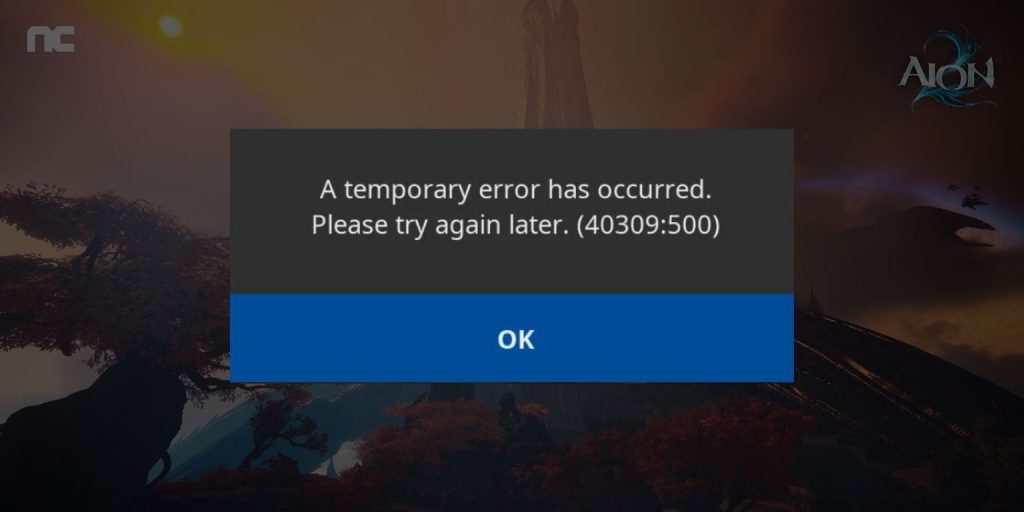
The Aion 2 device registration error appears when the game cannot confirm that your current device is approved for your account. Aion 2 uses device checks as part of its account security system, managed by NCSoft. When the verification process fails, the login request stops even though your username and password are correct. This protects accounts from unauthorized access but can block real players as well.
Players usually see this error during login, right after entering account details or launching the game through the Aion 2 Launcher. It can happen on PC, mobile platforms, or after reinstalling the game. The error does not mean the account is banned. It only means the device check did not pass.
Common Causes of Aion 2 Device Registration Error
This error can happen for several reasons, mostly related to device identity, network changes, or account security rules. In many cases, the game flags a login as unusual and stops access until verification succeeds.
Common causes include:
- Logging in from a new or previously unregistered device
- Change in IP address due to a different network
- Use of VPN, proxy, or emulator software
- Corrupted launcher or game client files
- Outdated Aion 2 launcher or game version
- Account security limits or verification requirements
- Temporary server-side device verification issues
How to Fix Aion 2 Device Registration Error?
This error usually appears when Aion 2 cannot confirm that your current device is trusted. The game checks device identity to protect accounts. When something changes, such as your network or system data, the login process may stop.
Fix #1: Restart the Game and Launcher
Temporary launcher or game glitches can break the device check process. Restarting clears short-term data and forces the system to reload account verification. After restarting, the launcher reconnects to Aion 2 servers and often completes device registration without issues.
Fix #2: Log In Using Your Previously Registered Device
If you have played Aion 2 before, the system may already trust one specific device. Logging in from that same device helps confirm your identity. Once logged in successfully, the game may allow you to register a new device later through normal use.
Fix #3: Disable VPN, Proxy, or Emulator
Aion 2 checks your IP address and device environment during login. VPNs, proxies, or emulators can change this information and cause verification to fail.
Turn off these tools completely before launching the game. After disabling them, restart the launcher and try logging in again.
Fix #4: Check Your Internet Connection and IP Stability
Frequent network changes can confuse the device verification system. Switching between Wi-Fi and mobile data, or using unstable internet, may trigger this error. Use one stable network and avoid reconnecting during login.
Once your IP stays consistent, device registration usually works.
Fix #5: Verify Account Security or Email Confirmation
Some accounts require additional verification before a new device is approved. This may include email confirmation or security checks linked to your account.
Follow the steps below to complete verification:
- Open your registered email inbox
- Look for messages from Aion 2 or NCSoft
- Open any security or verification email
- Click the confirmation link if provided
- Restart the launcher and log in again
Completing this step often clears the device block.
Fix #6: Update or Repair the Aion 2 Launcher
Outdated or corrupted launcher files can stop the device check process. Updating or repairing the launcher ensures it communicates correctly with the game servers.
Here’s how you can repair the launcher safely:
- Open the Aion 2 launcher
- Go to settings or launcher options
- Select Repair or Check Files
- Wait for the process to finish
- Restart the launcher
This refreshes core files used during login.
Fix #7: Clear Game Cache or Reinstall the Client
Broken cache or local game data can cause the system to misread your device. Clearing cache or reinstalling resets the game environment.
Try these steps to fix local data issues:
- Close the game and launcher
- Remove temporary game files if available
- Uninstall Aion 2 if the issue persists
- Download the game again from the official source
- Install and log in using a stable network
This gives the system a clean device profile.
Fix #8: Contact Aion 2 or NCSoft Support
If none of the fixes work, the issue may sit on the account or server side. Support teams can review your device status and manually assist with verification.
When contacting support, include:
- Your account ID
- Device type
- Operating system
- Time the error appeared
This helps speed up the process.
Prevention Tips to Avoid Aion 2 Device Registration Error in the Future
Preventing this error is easier than dealing with it after login fails. Small habits help keep your account trusted and reduce device verification problems. When the system sees consistent behavior, it usually allows access without trouble.
To lower the chance of seeing this error again:
- Log in from the same trusted device whenever possible
- Avoid VPNs or emulators while playing
- Keep the Aion 2 launcher updated
- Do not switch networks often during login
- Complete all account verification steps
- Use official launchers only
- Log out properly before changing devices
These steps help keep your account and device relationship stable.
Conclusion
In short, the Aion 2 device registration error appears when the game cannot verify the device linked to your account. It usually relates to device changes, network identity, or security checks rather than account bans.
If you face this error, understanding the causes and prevention tips can save time and frustration. When the issue continues, contacting official Aion 2 or NCSoft support is the safest option. If this article helped you, share it with other players and leave a comment about what worked for you.
